 bet9ja.uk
Bet9ja register: how to open an account online
Last checked 3 November 2026
Bet9ja registration is one free form with Name, Surname, Mobile Number, Email and Password, then a one-time password by SMS. Once the code is accepted, you go straight to the deposit page.
Welcome offer
Get your welcome bonus
New players only · 18+ · T&Cs apply



- 964 casino games
- ₦10 smallest stake
- Live betting and Zoom
- 5 site versions
Bet9ja registration at a glance
Bet9ja registration takes one screen and costs nothing. Once you are in, Bet9ja UK maps the rest, from login to the casino.
| Feature | Details | Good to know |
|---|---|---|
| Sign-up form | Open Account at registration.bet9ja.com | Check the address first |
| Boxes | Name, Surname, Mobile Number, Email, Password | Promotion Code is optional |
| Cost | Free | You pay only when you deposit |
| Age | “I am over 18 years old” box | Ticked when the page opens |
| Password | 8 to 20 characters | A letter and a number |
| Code | One-time password | By SMS as standard |
| Next screen | A deposit page | Most methods start at ₦100 |
| Accounts | One per person | Duplicates can be closed |
| Verification | Before a withdrawal or a new bank account | Five ID documents accepted |
How to open a Bet9ja account, step by step
Bet9ja sign up happens on one screen, headed Open Account:
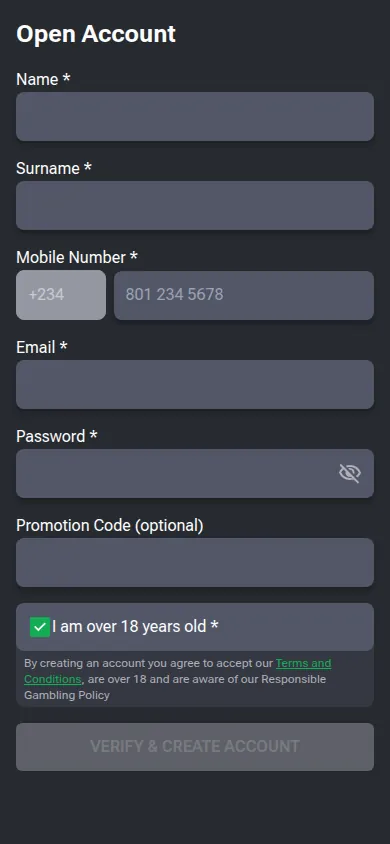
- Open registration.bet9ja.com
/registration/ , or press Register at the top right of the sports site.client - Name: your first name, as on your ID.
- Surname: your family name, letters only.
- Mobile Number: the +234 code is fixed, so type the 10 digits after it, starting 70, 80, 81, 90 or 91.
- Email: an address you can open.
- Password: 8 to 20 characters, with a letter and a number.
- Promotion Code (optional): type one or leave it empty.
- “I am over 18 years old”: ticked when the page opens, so keep the tick only if it is true.
- Press VERIFY & CREATE ACCOUNT, then type the one-time password sent by SMS.
Then the account is created and a deposit page opens. Creating it means you accept the General Terms linked from the form.
What each sign-up box accepts
The Bet9ja sign-up form sets a rule for every box:
| Box | Rule | Tip |
|---|---|---|
| Name | 2 to 50 letters, spaces between words | Two given names fit |
| Surname | 2 to 50 letters only | No spaces, hyphens, apostrophes or accents |
| Mobile Number | 10 digits after the fixed country code | No leading 0 |
| 6 to 50 characters | Verification checks it first | |
| Password | 8 to 20 characters | At least one letter and one number |
| Promotion Code | Up to 30 characters, no spaces | Can stay empty |
There is no box for a username, date of birth, state or country, though the General Terms expect an accurate date of birth and country of residency. Keep your ID to hand for verification.
Surnames with a hyphen or apostrophe
Surname takes letters only, so Smith-Jones or O’Brien cannot go in as printed. A name that differs from your ID can stall verification, so ask Customer Services how to write yours before you upload a document.
Password rules
Use 8 to 20 characters with at least one letter and one number, and keep the password to yourself: the terms say all bets stand when the correct username and password were entered. A new phone or browser asks for it once, even after you set a PIN.
Bet9ja register with a phone number
To register on Bet9ja with a phone number, type it after the country code: the Mobile Number box shows +234 in a locked field, and no other code can be picked.
- Length: 10 digits after +234, such as 801 234 5678.
- First digits: 70, 80, 81, 90 or 91, then eight more.
- No leading 0: start with the 7, 8 or 9.
The number can also receive a password reset and withdrawal codes by SMS, and the desktop login accepts it in place of a username. Use your own number: the General Terms ask for an accurate telephone number when you register.
Create an account on your phone or in the app
To create a Bet9ja account on your phone, start from Register in the version you use:
| Where you start | Where Register sits | Worth knowing |
|---|---|---|
| New Mobile | At the top, beside Login | Login is also in the bottom bar |
| Mobile Lite | Help steps: Login/Register at the top right, then Register | The live button reads Login |
| Old Mobile | Third tile, after New Mobile and Login | Hands you to the main sports site’s sign-up |
| App | Inside the app | Sign up there or use an existing account |
| Shop site | Its own Register link | A separate shop registration page |
You can also type the form address from step 1 into your phone’s browser. Download routes for Android and iPhone are on Bet9ja app.
Promotion Code and your first deposit
The Bet9ja Promotion Code box is optional and can stay empty. Bet9ja promo code covers what a code can mean.
As of November 2026, Bet9ja’s Promotions help page offers new customers a 100% welcome bonus on the first deposit, up to ₦100,000 (about £55.83 on 3 November 2026). Soccernet (9 October 2026) and Goal.com (2 November 2026) describe a ₦2,500 free bet instead, so check the offer shown after sign-up before you deposit.
For later deposits, choose Deposit from the drop-down menu at the top right. Most methods start at ₦100, and card or bank transfer deposits carry no Bet9ja fee, though your provider may charge. Pay from a card or account in your own name: money from someone else’s may be sent back, and bets placed with it voided.
Bet9ja account verification: documents and timing
Bet9ja account verification comes after sign-up and is needed before a withdrawal or a new bank account, with your email checked first:
- Open the withdrawals page and tap Start Verification.
- Choose your country of residence.
- Pick one of the accepted documents.
- Photograph its front and back, then submit.
The check runs through a phone camera; start on a computer and a QR code moves you to a mobile device. Five documents are accepted, among them the NIN Slip, the NIN ID card, a Voter’s Card and a passport. A result is promised within three minutes, and a manual check can take up to 72 hours.
Still waiting after 72 hours? The help page names three causes: an invalid or damaged document, a blurry picture, or a name that differs from your ID. The team then asks for another document.
Your Bet9ja ID and username
Your Bet9ja ID, the User ID, is a number, not your username. It shows at the top right of the desktop site once you log in, and as the last numbers in your Bets List. You quote it for ATM and some USSD deposits, payments from apps such as PalmPay, and complaints about a bet.
The sign-up form has no username box. The desktop login box reads Username or Mobile, so on the desktop site you can sign in with your mobile number; Old Mobile and the Shop site ask for a username. Lost it? Email cs@mybet9ja.com, and note that a username cannot be changed. Other sign-in routes and the PIN are on Bet9ja login.
One account per person and other rules
Bet9ja allows one account per person. Break a rule and this can follow:
| Rule | If it is broken |
|---|---|
| One account per person | Your accounts closed or only the first kept, bets on duplicates voided |
| True, checkable details | Bets voided, the account suspended or closed, the balance forfeited |
| 18 or over | The account closed and any winnings forfeited |
| Bank account in your name | The account suspended until your ID and a bank statement are checked |
Duplicates count even under a misspelt name or a different email. The account is for your own use and cannot be sold or transferred, and a registration can be refused without a reason. A closed account cannot be swapped for a new one, though it may be reopened on request after identity checks.
Sign-up problems and fixes
Stuck on the Bet9ja sign-up form? Find your problem below.
| Problem | Cause | Fix |
|---|---|---|
| Mobile number refused | A leading 0 or the wrong first digits | Start with the 7, 8 or 9 |
| Surname refused | A space, hyphen, apostrophe or accent | Letters only; ask Customer Services about the spelling |
| Password refused | Under 8 or over 20 characters, or no letter or no number | 8 to 20 characters with both |
| No one-time password | The SMS goes to the number typed in the form | Check the 10 digits, then write in under “Not registred users” |
| You already have an account | One account per person | Recover it with a Bet9ja password reset |
| Old account closed | A closed account cannot be replaced | Ask for it to be reopened |
The contact form, under Contacts on Old Mobile, lists “Not registred users” under Issue with and takes screenshots up to 10 MB. It aims to reply within 48 hours. Phone numbers and hours are on Bet9ja customer care.
FAQ
How can I register my Bet9ja account?
One form: Name, Surname, Mobile Number, Email, Password and an optional Promotion Code, then the over-18 tick. Press VERIFY & CREATE ACCOUNT and enter the one-time password sent by SMS.
How do I get my Bet9ja ID?
Log in on the desktop site and your User ID shows at the top right, or read the last numbers in your Bets List. It is not your username, and ATM and some USSD deposits ask for it.
How do I verify my Bet9ja account?
Five documents are accepted, the NIN Slip and a passport among them. Tap Start Verification on the withdrawals page, pick a document, photograph both sides and submit. A result comes within three minutes, or up to 72 hours by hand.
Is Bet9ja registration free?
Yes. Bet9ja’s own FAQ says opening an account is completely free of charge, so there is no registration fee. You pay only when you deposit, and 41 of the 44 deposit lines start at ₦100.
Can I register on Bet9ja with a UK phone number?
No. The Mobile Number box has one fixed country code and no +44 option, and it accepts only 10 digits starting 70, 80, 81, 90 or 91. A UK mobile does not fit that pattern.