 bet9ja.uk
Bet9ja computer version: the desktop website
Last checked 3 November 2026
Web Bet9ja is the bookmaker’s computer version at web.bet9ja.com: a full desktop site with Username or Mobile and Password boxes in its header, and the betslip, Fast Sport and Coupon Check on the page.
Welcome offer
Get your welcome bonus
New players only · 18+ · T&Cs apply



- 964 casino games
- ₦10 smallest stake
- Live betting and Zoom
- 5 site versions
Bet9ja desktop at a glance
Bet9ja desktop is the version built for a computer screen, one of five site versions compared on Bet9ja UK. Also typed as web bet9ja, web.bet9ja or bet9ja web.
| Feature | Details |
|---|---|
| Address | web.bet9ja.com, opening on its Sport page |
| Login | Username or Mobile, then Password |
| Top menu | Sports, Live, Casino, Virtual, Super9ja, Promotions and more |
| New account | Register, under the login box |
| Betting tools | Insert Booking Number, Fast Sport, Coupon Check, Odds Less Than |
| Clock | West Africa Time, shown as GMT+01:00 |
| Smallest stake | ₦10 on sports, ₦100 on a live bet |
| Desktop app | None; the download page is for iPhone and Android |
| From a phone | Website, in the Old Mobile menu |
Web Bet9ja: what the computer version shows
Web Bet9ja opens straight onto its Sport page, with the login box in the header and two menu rows across the top.
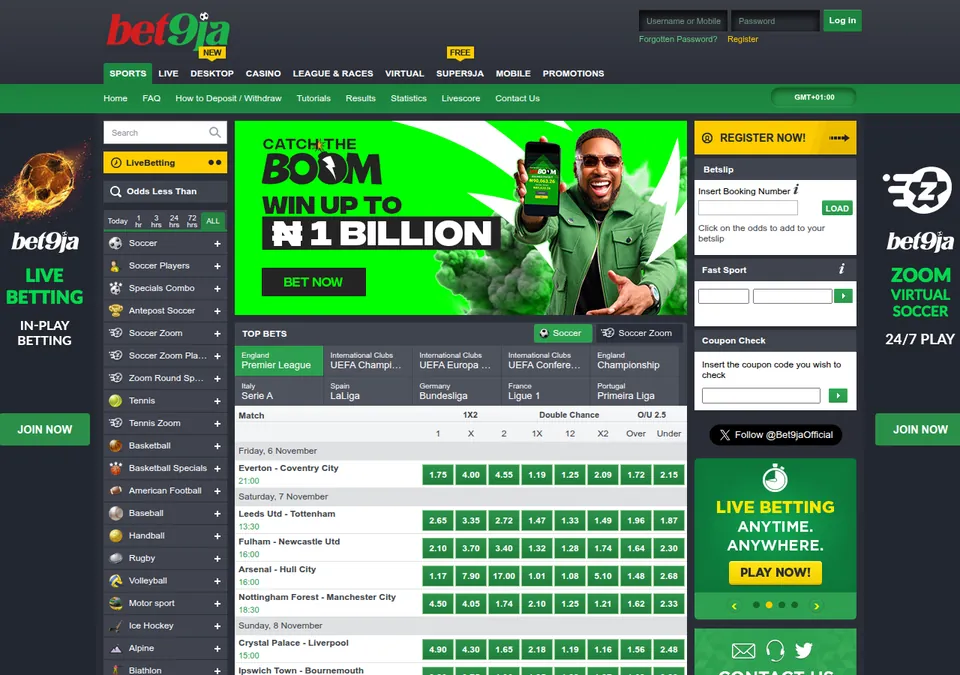
The top row lists Sports, Live, Desktop, Casino, LEAGUE & RACES, Virtual, Super9ja, Mobile and Promotions. The second carries My Account, FAQ, How to Deposit / Withdraw, Results, Statistics, Livescore and Contact Us.
Times are West Africa Time, shown as GMT+01:00. In winter that is one hour ahead of London, so a 20:00 kick-off on the page starts at 19:00 in the UK. From 28 March 2027 the two clocks match.
Typing www instead of web opens the main sports site, with Login top right and Old Desktop in its second menu line.
How to open the Bet9ja computer version
Open the Bet9ja computer version in your browser in four steps:
- Type the address from the table above into the address bar, starting with web, not www.
- Let it forward to the Sport page, with the login box in the header.
- Log in with your username or mobile number and password, or click Register under the box to open an account.
- Bookmark the page, so next time it is one click away.
On Bet9ja Old Mobile, Website, second to last of its 28 menu items, lands on the same page.
Logging in on the desktop site
The Bet9ja desktop login takes a username or a mobile number. The header box reads Username or Mobile, then Password and Log in, with Forgotten Password? and Register below.
If login fails, a Login Error box reads “Sorry, we have had a problem logging you in, please try again!” To reset your password:
- Click Forgotten Password? under the login box.
- Choose Email or SMS Message under “Change password via:”.
- Enter the email address or mobile number registered to your account, then press Continue.
Lost your username? The help FAQ says to email Customer Services. PIN login is a mobile feature, so on a computer you use your password. On a shared PC, log out when you finish: under the General Terms, every bet stands once the correct username and password were entered. Phone logins are under Bet9ja login.
Booking numbers, Fast Sport and Coupon Check
Bet9ja booking numbers, Event Codes and coupon codes do three different jobs, and the page gives each its own box:
| Box | What you type | What it does |
|---|---|---|
| Insert Booking Number, then LOAD | A booking number | Loads saved selections into your betslip; nothing is staked yet |
| Fast Sport | An Event Code | Adds that one event to your betslip |
| Coupon Check | The coupon code of a placed bet | Finds a bet that already exists |
| Odds Less Than | An odds limit | Filters events by their odds |
Log out before you create a booking code, as the help page says, and load shared codes soon, because they can expire. Coupon Check also repeats a bet: log in, check its code, click Rebet at the bottom of the betslip, then set your stake and click Bet.
Live betting, streaming and Cash Out on desktop
Bet9ja live betting on desktop starts at ₦100 a bet. A live bet is rejected if the odds move while it waits for acceptance, unless you tick Accept Change Odds on the coupon. To stream a match:
- Keep at least ₦200 in your account.
- Go to the live betting section and click the video recorder icon.
- Click the arrow in the green box on the right for a pop-up video, and bet while it plays.
The calendar button lists the week’s streamed events. A My Cashouts button appears when you have active bets that can be cashed out. Partial Cash Out works from the small icon on the cash out button, with a slider. Bets placed with bonus funds cannot be cashed out.
Bet9ja website version on a phone
The Bet9ja website version, also called the Bet9ja web version, opens on a phone as well, in two ways:
- Tap Website in the Old Mobile menu, as above.
- Switch on the desktop version option in your phone’s browser (often called Desktop site), then open the address.
The computer version keeps its text and menus in the page itself, while New Mobile draws its screens with JavaScript. For betting on a small screen, the phone sites are New Mobile, Mobile Lite and Old Mobile; New Mobile and Mobile Lite are covered on Bet9ja mobile.
Desktop app download: is there one?
No. Bet9ja’s app download page describes itself as a page for iPhone and Android and offers no Windows or Mac app. In December 2025 it sent iPhones, iPads and Macs to the App Store and every other device, Windows PCs included, to the Android download. On a PC or Mac, bookmark the computer version and log in there.
Deposits and withdrawals on the desktop site
For Bet9ja deposits on a computer, How to Deposit / Withdraw in the second menu row opens the Payment Methods page, with the limits for all 44 deposit lines. Pound figures use ExchangeRate-API’s reference rate for 3 November 2026, £1 = ₦1,791.01.
| Task | How | Rule |
|---|---|---|
| Deposit | Log in, pick Deposit from the drop-down menu, choose a method | From ₦100, about 6p, on 41 of 44 lines |
| Pending deposit | Deposit history, Pending tab, Query | Web Pay and Flutterwave, after 15 minutes |
| Withdraw | My Account, Withdraw, then Make Withdrawal | From ₦1,000, about 56p, to your registered bank account |
| Verify | Start Verification on the withdrawals page; a QR code moves you to your phone | Needed before a withdrawal |
A withdrawal asks for a one-time password by SMS or email. Withdrawals are usually processed within 24 banking hours, and the General Terms give 5 banking days as the outer limit.
FAQ
What is web Bet9ja?
It is the bookmaker’s full computer site at web.bet9ja.com, opening on the Sport page with a Username or Mobile login box in the header and booking, Fast Sport and Coupon Check boxes on the page.
How do I open the Bet9ja computer version on my phone?
Two steps: open Old Mobile in your phone’s browser, then tap Website, the second-to-last item in its menu. You land on the full site, where the login takes a username or mobile number.
Is there a Bet9ja desktop app for PC?
No. The download page offers no desktop app for Windows or Mac: it covers iPhone and Android only. On a PC or Mac, open the computer version in your browser and log in there.
Is Bet9ja Old Desktop still available?
Yes. As of November 2026 the main sports site still shows an Old Desktop link in its second menu line, right after Coupon Check. The computer version also still opens, with its login box in the header.
Can I open a new Bet9ja account on the desktop site?
Yes, through Register, under the login box in the header. The Open Account form asks for your name, surname, mobile number, email and password, then a one-time code. Signing up is free.